
Introduction: Understanding AI for Programming
Artificial Intelligence (AI) is no longer just a futuristic concept—it has become a game-changer in the world of software development. AI for programming refers to the use of advanced machine learning models, natural language processing (NLP), and other AI technologies to assist developers in writing, debugging, testing, and optimizing code. From automating repetitive coding tasks to predicting errors before they occur, AI is rapidly changing how programmers approach software development.
The benefits of using AI for programming are manifold. Developers can speed up the coding process, reduce human errors, and even get real-time suggestions for code improvement. With AI-powered tools, tasks like code completion, bug detection, and automated testing, which traditionally required hours of manual work, can now be done efficiently and accurately.
For example, platforms like GitHub Copilot and OpenAI Codex provide AI-assisted coding by suggesting entire blocks of code based on natural language descriptions. This means a developer can write a comment like “create a function to sort a list of numbers” and the AI will generate the code automatically. Similarly, AI tools like DeepCode and Snyk can scan large codebases, detect vulnerabilities, and suggest fixes, improving both speed and code quality.
Moreover, AI in programming is not limited to writing code. It extends to testing, debugging, and even project planning. By analyzing patterns in previous projects, AI can suggest optimal development approaches, predict potential bottlenecks, and enhance collaboration within teams.
In this comprehensive guide, we will explore every aspect of AI for programming, including the types of AI used in coding, practical applications, popular tools, challenges, and the future of AI-assisted development. Whether you are a beginner programmer or an experienced developer, understanding how AI integrates into programming workflows is essential to stay competitive in today’s fast-evolving tech landscape.http://aibygoogl.com
Understanding AI in Programming
Artificial Intelligence for programming is a concept that combines advanced algorithms and machine learning models to assist developers in writing, debugging, and optimizing code. Unlike traditional programming, where every line of code must be manually written and reviewed, AI-powered tools can analyze patterns, predict errors, and even generate functional code, making software development faster and more efficient.
What is AI in the Context of Programming?
AI in programming refers to the integration of machine intelligence into coding workflows. It uses techniques like:
- Machine Learning (ML): AI models learn from existing code patterns to predict or suggest new code.
- Natural Language Processing (NLP): AI interprets human language, allowing developers to write instructions in plain English, which the AI then converts into functional code.
- Automated Reasoning: AI can analyze code logic to detect inconsistencies, bugs, or potential performance issues.
This combination allows AI to perform tasks that traditionally required human intervention, from code completion to bug detection. For instance, AI can automatically refactor a piece of code to improve performance or highlight security vulnerabilities before they become critical issues.
Types of AI Used in Programming
AI for programming comes in several forms, each serving a specific purpose:
- AI-Powered Code Completion Tools
- Examples: GitHub Copilot, Tabnine
- These tools suggest code as you type, reducing repetitive work and accelerating development.
- AI Debugging Tools
- Examples: DeepCode, CodeGuru
- These tools analyze code for bugs and suggest fixes, sometimes even automatically correcting errors.
- AI Testing Tools
- AI can generate test cases, perform regression testing, and monitor code performance over time.
- AI-Driven Code Review Platforms
- AI assists in reviewing pull requests, ensuring coding standards, and detecting inefficiencies.
Key Benefits of AI for Programmers
Using AI in programming offers several tangible benefits:
- Faster Development: Code generation and automated suggestions save hours of manual work.
- Reduced Errors: AI can catch common mistakes, logic errors, and security vulnerabilities early.
- Enhanced Productivity: Developers can focus on creative problem-solving while AI handles repetitive tasks.
- Better Code Quality: Continuous AI-driven code review ensures cleaner, optimized, and maintainable code.
Case Study:
A 2023 study by Forrester Research found that companies integrating AI-powered coding tools saw a 30% reduction in development time and a 25% decrease in production bugs, proving the real-world efficiency of AI in programming.
How AI is Transforming Software Development
AI for programming is not just a futuristic idea—it is actively reshaping software development workflows across industries. From generating code to detecting bugs, AI tools are helping developers work smarter, faster, and with higher accuracy. Let’s explore how AI is transforming each aspect of software development.
AI-Powered Code Generation Tools
One of the most significant impacts of AI in programming is code generation. AI-powered platforms such as GitHub Copilot, OpenAI Codex, and Tabnine can analyze natural language instructions or existing code and generate functional code snippets automatically.
Key Benefits:
- Speeds up coding by suggesting whole blocks of code.
- Reduces manual errors by using tested patterns.
- Supports multiple programming languages, including Python, JavaScript, Java, and C#.
Example: A developer can type a comment like, “Create a function to filter all even numbers in a list”, and the AI will generate the corresponding Python function instantly. This not only saves time but also allows developers to focus on more complex logic and problem-solving.
AI in Debugging and Error Detection
Debugging is often one of the most time-consuming aspects of programming. AI for programming can analyze entire codebases to detect bugs, vulnerabilities, or performance issues.
How it works:
- AI tools scan for patterns of common errors.
- Suggest potential fixes or automatically correct them.
- Identify edge cases that human developers might overlook.
Popular Tools: DeepCode, CodeGuru, and Snyk.
Impact: Companies using AI-driven debugging have reported up to a 40% reduction in post-deployment bugs, which improves overall software reliability.
AI in Testing and Quality Assurance
Testing is critical for software quality, and AI has significantly streamlined this process. Traditional manual testing can be slow and error-prone, but AI can:
- Generate automated test cases based on code changes.
- Perform regression testing to ensure new code doesn’t break existing functionality.
- Monitor performance metrics and detect anomalies.
Example: An AI testing tool can simulate thousands of user interactions in a web application to detect issues that a human tester might miss.
AI for Code Optimization
Optimizing code for performance and efficiency is another area where AI excels. AI tools can:
- Suggest refactoring techniques to reduce complexity.
- Identify bottlenecks in algorithms.
- Recommend better data structures or approaches for faster execution.
Fact: According to a 2023 TechRepublic survey, teams using AI-assisted code optimization reduced execution time by 15-20% on average across various applications.
Summary
AI is transforming software development by automating repetitive tasks, enhancing code quality, and accelerating development cycles. From generating code to detecting errors and optimizing performance, AI tools are becoming indispensable for modern developers.
Practical Applications of AI for Programming
AI for programming isn’t limited to just code generation or debugging—it is increasingly being applied across various domains of software development. By integrating AI into different stages of development, teams can enhance productivity, improve quality, and innovate faster.
AI in Web and App Development
AI is revolutionizing web and app development in several ways:
- Dynamic UI/UX Design: AI tools can suggest layouts, design elements, and responsive adjustments based on user behavior and trends.
- Code Suggestions for Frontend/Backend: AI can assist in generating HTML, CSS, JavaScript, and backend code snippets quickly.
- Automated Testing: AI-powered testing ensures apps function flawlessly across devices and platforms.
Example: Using AI-powered frameworks, developers can create a fully functional e-commerce website prototype in hours instead of days, with optimized UX and responsive design features.
AI in Game Development
Game development involves complex logic, AI behaviors, and extensive coding. AI tools are increasingly helping developers in this sector:
- AI-Driven Game Mechanics: AI can simulate NPC (non-player character) behaviors, creating more dynamic gameplay.
- Script Generation: AI can automatically generate game logic, dialogue systems, and event triggers.
- Testing and Optimization: AI can simulate thousands of playthroughs to detect bugs or balance issues.
Case Study: Ubisoft experimented with AI-assisted NPC behavior design, reducing development time for complex interactions by up to 35% while increasing player engagement.
AI in Data-Driven Applications
Modern applications often rely on data processing, analytics, and machine learning models. AI can help developers integrate these processes seamlessly:
- Automating Database Queries: AI can suggest or generate SQL queries based on user requests or data needs.
- Data Analysis and Visualization: AI tools can automate data cleaning, processing, and even generate visual dashboards.
- Predictive Analytics Integration: AI can embed predictive models into applications, enabling smarter, data-driven decisions.
Example: An AI tool can automatically detect trends in sales data and suggest code to generate predictive sales forecasts in a retail application.
Summary
The practical applications of AI for programming span web development, mobile apps, gaming, and data-driven solutions. By automating repetitive coding tasks, enhancing logic design, and enabling advanced analytics, AI empowers developers to focus on creativity and innovation, making software development more efficient and impactful.
Popular AI Programming Tools and Platforms
AI for programming relies heavily on specialized tools and platforms that streamline coding, debugging, and testing workflows. These tools leverage AI to enhance productivity, reduce errors, and support developers across multiple programming languages and frameworks.
AI Code Assistants
AI code assistants are perhaps the most widely used tools for AI-assisted programming. They predict, suggest, and even generate code based on natural language inputs or existing code context.
Popular AI Code Assistants:
| Tool | Key Features | Supported Languages |
|---|---|---|
| GitHub Copilot | AI-powered code completion, function suggestions, comment-based code generation | Python, JavaScript, TypeScript, Go, Ruby, C# |
| Tabnine | Predictive code suggestions, multi-line completions, AI learning from team codebase | Python, Java, C++, JavaScript, PHP |
| OpenAI Codex | Converts natural language instructions into code, integrates with IDEs | Multiple languages including Python, JavaScript, Java, C# |
These assistants are especially useful for accelerating coding, reducing repetitive tasks, and helping new developers learn faster.
AI Debugging and Testing Tools
AI also plays a critical role in debugging and ensuring software quality. These tools can analyze code for errors, vulnerabilities, and performance issues while providing actionable suggestions.
Key AI Debugging Tools:
- DeepCode: Scans code for bugs and security vulnerabilities using AI algorithms.
- Snyk: Identifies security issues in open-source libraries and code dependencies.
- CodeGuru (by AWS): Provides automated code reviews, identifies inefficiencies, and recommends improvements.
Benefits:
- Reduces time spent manually reviewing code.
- Increases reliability and security of applications.
- Helps maintain coding standards across teams.
Other AI-Enhanced Developer Tools
Beyond code assistants and debugging, there are additional AI tools that support documentation, project planning, and overall development workflow:
- AI-Enhanced IDEs: Integrated Development Environments with AI features like predictive typing, refactoring suggestions, and error detection.
- AI for Documentation: Tools that automatically generate or update code documentation based on project changes.
- AI Project Analytics: Platforms that use AI to track development progress, predict project delays, and optimize team workflows.
Example: Companies integrating AI-enhanced IDEs reported up to 25% faster development cycles because developers spent less time on mundane tasks and more time on strategic coding work.
Summary
Popular AI programming tools and platforms, including code assistants, debugging systems, and AI-enhanced IDEs, are transforming how developers write, test, and optimize code. By leveraging these tools, teams can improve productivity, enhance code quality, and innovate faster, making AI an indispensable part of modern software development.
How to Start Using AI for Programming
Integrating AI into your programming workflow might seem daunting at first, but with the right approach and tools, it can dramatically enhance your productivity and code quality. This section outlines how developers can begin leveraging AI for programming effectively.
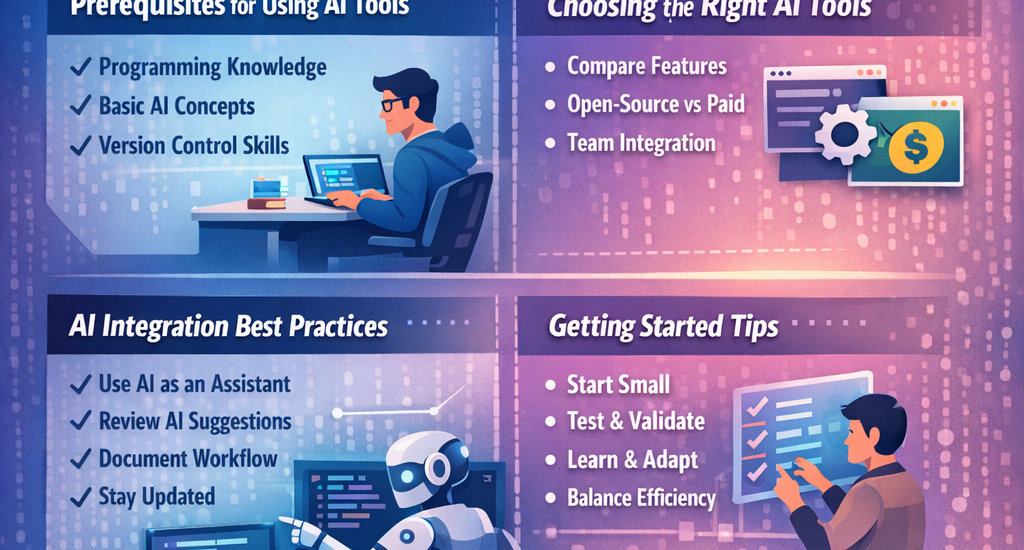
Prerequisites for Using AI Tools
Before diving into AI-assisted programming, it’s important to have a solid foundation:
- Programming Knowledge: Familiarity with at least one programming language (Python, JavaScript, Java, etc.) is essential.
- Understanding of AI Concepts: Basic knowledge of AI, machine learning, and natural language processing will help you maximize AI tools’ potential.
- Version Control Skills: Tools like Git are important since most AI platforms integrate with your code repository for real-time suggestions.
Having these prerequisites ensures that AI complements your skills rather than replacing them.
Choosing the Right AI Tools for Your Project
With a variety of AI tools available, selecting the right one depends on your project goals, budget, and workflow:
- Compare Features: Some tools excel at code completion (GitHub Copilot), while others focus on security (Snyk) or testing (DeepCode).
- Open-Source vs Paid: Open-source tools are free and customizable but may require more setup. Paid platforms offer support and advanced features.
- Team Integration: Consider tools that integrate seamlessly with your IDE, code repository, and team workflow.
Tip: Start with one AI tool, experiment with its features, and expand gradually to avoid overwhelming your workflow.
Best Practices for Integrating AI in Coding Workflow
To get the most out of AI for programming, follow these best practices:
- Use AI as an Assistant, Not a Replacement: AI can suggest and optimize code, but human judgment is crucial for logic, creativity, and project-specific decisions.
- Review AI-Generated Code: Always validate and test the AI’s suggestions to ensure correctness, security, and efficiency.
- Document Your Workflow: Keep records of how AI tools are used to maintain clarity in team projects.
- Stay Updated: AI tools evolve rapidly; regularly explore new features and updates to leverage improvements.
- Balance Efficiency with Learning: While AI can speed up coding, continue to practice and understand programming fundamentals to grow your skills.
Summary
Starting with AI for programming involves preparing your skills, selecting the right tools, and following best practices. By approaching AI as a collaborative partner rather than a replacement, developers can boost productivity, improve code quality, and innovate more effectively.